




Extension of a GCS compute project on SuperMUC
When can I apply for a project extension?
- GCS test project:
An application for an extension of a GCS test project can be submitted anytime after the start date of the GCS test project. GCS test projects can be extended into a GCS regular project (anytime) or a GCS Large-Scale project (twice per year during a GCS Large-Scale call). - GCS regular project:
An application for an extension of a GCS regular project can be submitted anytime after the project start date, but latest 2 months before the project end date. - GCS Large-Scale project:
GCS Large-Scale projects should be extended during a GCS Large-Scale call (twice per year).
Extension process
The image shows the process of extending a GCS regular, large scale, or test project on SuperMUC-NG. All applications for projects on SuperMUC are managed through the GCS-JARDS tool, hosted by GCS, the Gauss Centre for Supercomputing. GCS-JARDS is used to manage the review process, collect status reports, final reports, dissemination material, and to manage project extensions.
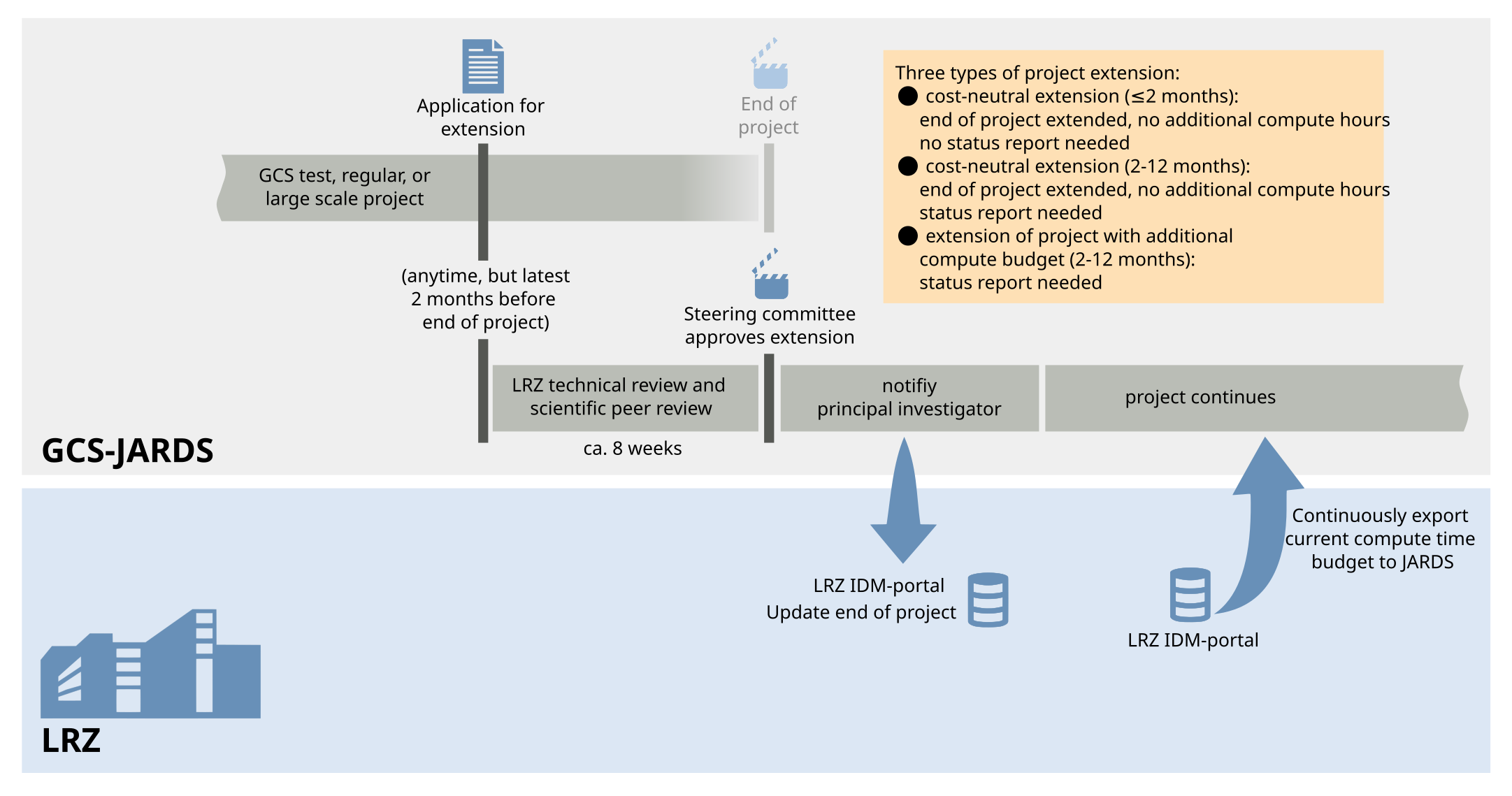
Important information on project extension for compute projects on SuperMUC-NG
- Application for extension has to be done at least 2 months before end of project
- A status report is needed to extend a project. For details and templates, see the Reporting obligations on SuperMUC-NG.
- After finalizing your application within the GCS-JARDS website, you will be asked to print out and sign the "Principal Investigator’s Agreement for Access to HPC resources". Scan the signed document and email it to HPC-Benutzerverwaltung@lrz.de.
- Project extension typically needs technical and scientific review (allow 6-8 weeks)
How to extend your project
Only the Principal Investigator (PI) or the Person of Contact (PC) can apply for a project extension.
A project extension is managed via a new application within GCS-JARDS.
Direkt link to GCS-JARDS: https://jards.gauss-centre.eu/gcshome/.
In the left column, "Application", in the drop-down-list for "Compute Time Calls", select "GCS large scale project" if you want to extend a GCS large scale project or select "Regular HLRS/LRZ and test projects" to extend a GCS regular or test project. Log-in with your GCS-JARDS user account or use "email callback" (GCS-JARDS is hosted by Jülich Supercomputing Centre).
A new page opens, and all projects associated with your email address are listed. Next to the project-ID, you will find the "extend" button.
Follow the 7 steps on the GCS-JARDS website.
Once you finalized the application to extend your compute project, you will be notified usual within 6-8 weeks if the extension has been granted.