How can I access TUMonline?
You can access TUMonline using a web browser via the address campus.tum.de.
What do I need?
- a computer with an internet connection
- a web browser
Tipp: You can find information on recommended browsers and the use of pop-up blockers and Acrobat Reader by clicking on the white "Info Button" in TUMonline in the top right-hand corner:
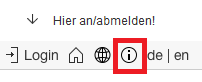
Screenshot: Info Button in TUMonline
What does TUMonline offer you?
- You can search for people, facilities (organizations) and rooms at the TU München
- You can obtain an overview of the lectures of the organizations at the TU München
- You can view module descriptions and courses
- You have the option of editing your personal “business card” (homepage, telephone, consultation times)
- You can select and edit your TUM e-mail addresses
Special features for lecturers: - You obtain an overview of your own lectures and examinations
- You can manage participating students and communicate with them via e-mail
- You can use a personal calendar in which the dates of your lectures and examinations automatically appear and to which your own dates can be added
- And much more besides …
Where do I get help?
For all questions and problems concerning TUMonline please contact the IT-Support: it-support@tum.de